
Top 5 Best AI Studio Ghibli Image Generators in 2026 (Tested & Reviewed)
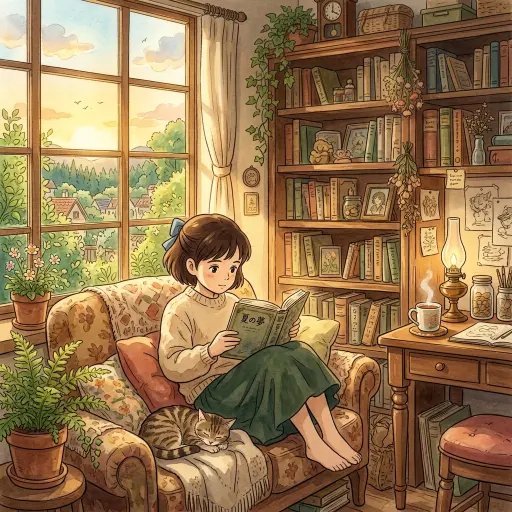
If you are a fan of Hayao Miyazaki, you know the magic of Studio Ghibli. It is that perfect mix of soft watercolor textures, fluffy clouds, and warm golden hour lighting that makes every frame feel nostalgic. Getting an AI to replicate this specific, hand-drawn animation aesthetic used to be a nightmare. Early tools just slapped a cheap cell-shading filter over your photos.
Today, the technology has caught up. In 2026, we have robust image-to-image pipeline models that actually understand how to paint like a Ghibli artist. But the AI Anime community is deeply polarized. When a viral Ghibli-style AI video recently hit 577,000 views, one top comment quoted Miyazaki himself, calling it an “insult to life itself.”
This is why picking the right tool matters. You do not just want a filter. You want a tool that respects the art style, offers high Ghibli accuracy, and fits your specific workflow. Whether you want a quick avatar or need a highly detailed anime illustration, here are the top 5 text-to-image AI generators to use right now.
What Makes an AI Image Look Like Studio Ghibli
Before you pick a tool, you need to know what you are looking for. An authentic Studio Ghibli aesthetic relies on a few key elements. If your AI anime generator misses these, the image will just look like generic anime.
· Soft watercolor textures and pastel colors
· Warm golden hour lighting that feels cozy
· Highly detailed backgrounds like rich green landscapes and mossy stones
· Expressive but soft character designs with rounder features
How We Tested the AI Art Generators
To find the best tools, we put them through a strict methodology. We did not just look at pricing. We ran the exact same DALL-E 3 prompt across all platforms to test their native capabilities.
We judged them on: 1. Color accuracy and anime style matching. 2. How well they handled backgrounds versus characters. 3. Pricing and ease of use for beginners.
Midjourney Niji 6 for the Highest Artistic Quality
Midjourney Niji 6 is widely considered the current gold standard for anime art. It is specifically fine-tuned for Japanese animation styles.
To use it, you either need a Discord account or access to the web alpha. Once you are in, the results are stunning. Niji 6 excels at capturing the exact watercolor textures and whimsical atmosphere of classic films. It understands complex environmental prompts better than almost any other tool.
Pros for new users include unmatched artistic quality and an active community. Cons include a slightly confusing setup if you use Discord, and there is no free tier available anymore.
Stable Diffusion for Total Control
If you are a power user, Stable Diffusion is your playground. By using specific Civitai models (like a dedicated Stable Diffusion LoRA), you can train the AI to generate exact replicas of the Miyazaki style.
This is not a simple web app. You will need a strong GPU to run it locally or use a cloud service. But it gives you total control over the generation process, allowing for advanced techniques like inpainting and ControlNet.
Pros for advanced workflows include complete creative freedom, censorship-free generation, and it is entirely free if you run it locally. Cons include a very steep learning curve and high hardware requirements.
Ghibli-Art.io for Instant Specialized Results
Sometimes you just want the specific look without messing with complicated prompts or heavy software. This is where dedicated platforms shine. Ghibli-Art.io is built specifically for this niche.
Because it is specialized, it consistently beats general-purpose tools when you just need a fast, accurate result. You do not need to write a massive prompt explaining what “Ghibli” means. The underlying model already knows.
Pros include lightning-fast generation speeds and a very beginner-friendly interface. It is the perfect middle ground between the complexity of Stable Diffusion and the simplicity of basic filters.
ChatGPT and DALL-E 3 for Absolute Beginners
For absolute beginners, nothing beats the ease of ChatGPT with DALL-E 3. You simply type what you want in plain conversational English.
DALL-E 3 is incredibly smart when it comes to composition. If you ask for a boy standing next to a giant friendly spirit in a forest, it will place everything perfectly. However, it struggles slightly with the raw watercolor texture. Its output often looks a bit too clean and 3D.
Pro Tip: To get better results with DALL-E 3, explicitly ask it to use a “flat 2D, hand-drawn cel-shading style with visible watercolor brush strokes.”
Pros for casual users include zero learning curve and excellent prompt adherence. Cons include a slightly plasticky look to the final images.
OpenArt for Web Based Editing
OpenArt is a fantastic platform for intermediate creators. According to recent community discussions, users highly recommend OpenArt because it offers advanced features right in your browser.
You can use pre-built Ghibli style reference tools. More importantly, it offers inpainting. If the AI generates a perfect landscape but messes up the character’s hand (a very common issue), you can just highlight the hand and ask OpenArt to redraw it.
Pricing tiers are reasonable, and they offer a free credit system to get you started. Pros include a great mix of power and ease of use. Cons include the fact that you have to manage credits.
Comparison Table Feature Breakdown
To make your decision easier, here is a quick feature breakdown of how these tools stack up.

The Ultimate Copy and Paste Ghibli Prompt Template
A proven formula will save you hours of frustration. When writing your prompt, you must include the Subject, the Environment, the Lighting, and the Style tags.
Here is the master template: - “[Subject doing an action], [Detailed environment], Studio Ghibli aesthetic, Hayao Miyazaki art style, soft watercolor textures, cel-shading, warm golden hour lighting, highly detailed.”
Here are three example variations you can try right now: 1. Landscape: “A lush green hillside with a single large oak tree, fluffy white clouds in a bright blue sky, Studio Ghibli aesthetic, soft watercolor textures, warm sunlight.” 2. Character: “A young girl with short brown hair carrying a satchel, standing in a cobblestone street, Hayao Miyazaki art style, cel-shading, expressive eyes.” 3. Food: “A steaming bowl of ramen with pork slices and green onions on a wooden table, Studio Ghibli aesthetic, highly detailed, soft warm lighting.”
Why Artists Are Angry
We cannot talk about AI anime generators without addressing the pushback. Animating these AI creations often breaks the illusion. As one user noted on a viral AI Animation Workflow video, “The walking feels unnatural it’s probably also breaking a principle of animation.”
Beyond technical flaws, there is a deep ethical debate. Many fans reject AI art on philosophical grounds. One user pointedly stated, “If i wanted to see passion, i would see a human.”
This tells us that AI tools should be viewed as concept visualization aids or fun personal projects, rather than direct replacements for human artists who pour their souls into every frame.
My Final Verdict on Which Tool to Pick
Choosing the right generator comes down to your technical skill and your budget.
If you are a budget user who just wants to play around, start with ChatGPT. If you want specialized, fast results, use Ghibli-Art.io. If you are a professional illustrator looking to generate high-quality concept art, you need to invest the time to learn Midjourney Niji 6 or set up a local Stable Diffusion environment.
Frequently Asked Questions
Is there a completely free AI generator for this style? Stable Diffusion is completely free if you have the hardware to run it locally on your computer. Other platforms like OpenArt offer free daily credits.
Can I use these images commercially? This depends heavily on the platform’s terms of service. Midjourney allows commercial use for paid members, but you should always check the specific copyright rules of the tool you choose.
Why do AI characters look weird when animated? Maintaining consistency is incredibly hard for AI. Tools like Kling AI are improving this, but maintaining 100% consistency across different angles usually requires a complex workflow.
What is a LoRA? A LoRA is a small file that you plug into Stable Diffusion to teach it a specific concept. A Ghibli LoRA teaches the base model exactly how to draw in that specific animation style.
Can I turn my own photo into a Ghibli character? Yes. Tools like OpenArt and specialized mobile apps have image-to-image features. You upload your photo, and the AI redraws it using the anime style guidelines.